

Content Index
11: Pinion

Also in this article I had talked about an App that makes you earn money by answering questions and it was Google Opinion Rewards. But know that it is not the only application in Brazil with this function, there are some others like Pinion. Like the other apps mentioned here, this one can also be found on both the Play Store and the App Store.
The balance values that you can get in this App vary a lot, there are some simple ones that give R$0.25 and others more complex. The most complex ones are between R$5.00 and R$15.00 as they are tasks that you will have to leave the house to answer.
Your balance can be redeemed by deposit or PayPal and in order to do this, you will have to accumulate a balance of R$30.00. That is, if you answer two complex questions that pay 15, you can make your first withdrawal and use the Free Fire Balance.
But how do I use Pinion?
You will first have to download it, and your download link will follow, just click and download it.
After downloading the application you will run it and click on the option “I want to register” and then add your personal information. In addition to filling in data such as email, name, date of birth, etc., you will also have to create a password, and click on “Send registration”.
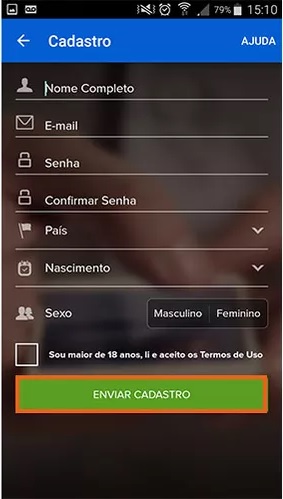
After downloading the application you will run it and click on the option “I want to register” and then add your personal information. In addition to filling in data such as email, name, date of birth, etc., you will also have to create a password, and click on “Send registration”.
Now you will have to answer questions in order to accumulate balance and use it in the future in Free Fire or in any other game. For you to do missions, that is, answer surveys and get balance, you will have to click on the central icon, with a “location pin”. There you'll find two types of missions, the “localized”, which you'll have to move around and the “virtual”, which you can do in the application itself.
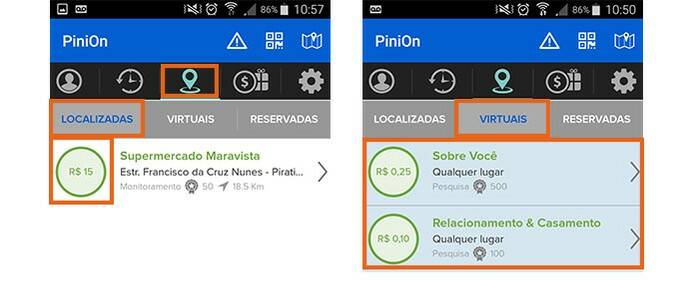
Now just do your missions and accumulate points and more points, but how do I redeem my balance?
How to redeem balance
You will have to look for the “$” icon, it is on the right side of your mobile screen, with the application open, obviously. Now you will have to click on “Withdraw” and then choose whether you want to do the procedure through a bank or PayPal. I will leave a print below illustrating the entire procedure.
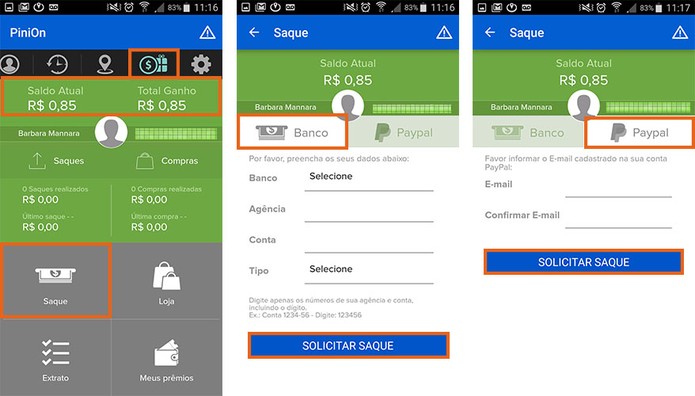
After all the procedure done, just wait and wait for your balance to drop into your bank or PayPal.

